Monthly Archives: April 2012

Removing User Login Data from Non-Production Environments

As part of updating your AX 2009 non-production environments I recommend running a script to remove user login data so you can see who is using your environment and it doesn’t cloud things with it having LIVE login data in there.

This script will delete user log data prior to the database creation date (which should be the restored date of the database if a RESTORE DATABASE WITH REPLACE was used)

The user log data can be viewed in AX2009 via ‘Administration > Inquiries > User Log’

Initially run this query to determine the AX DB creation date:

SELECT create_date
FROM
sys.databases
WHERE
name =  '<Your AX Database Name>'

Once you’ve verified the date is okay run the below script:

/* Delete User Login Data based upon Database Creation Date */
DECLARE @dbcreatedate DATETIME

/* Get Database Creation Date */
SELECT @dbcreatedate = create_date
from
sys.databases
WHERE name = '<Your AX Database Name>'

SELECT @dbcreatedate AS Database_Creation_Date

/* Delete User Login Data */
DELETE FROM SysUserLog
WHERE
CREATEDDATETIME < @dbcreatedate

Download  Delete-User-Login-Data-using-Database-Creation-Date (7411 downloads )
Run a Dynamics AX SQL statement as an API Cursor in SSMS

We all know that AX2009 uses cursors extensively – simply executing a SQL statement in SSMS doesn’t always result in the same query plan being used that an AX generated SQL statement would use.

Want to run a query in SQL Management Studio exactly how Dynamics AX 2009 runs the query e.g. as a API Cursor so you can ensure you are looking at the same query plan AX has used then run the query below.

Simply replace the red text below with all the query variables and replace the blue text with your parameters and execute the full statement and voila you can view the exact query plan AX uses to execute the statement.

TIP: If your unsure of the variables to declare in the cursor you can find them by doing a SQL Profiler Trace.

———————————————-
— Normal FFO Cursor
———————————————-

— Script taken from AX Dynamics Performance Analyzer scripts by Rod Hansen (http://code.msdn.com/dynamicsperf)

declare @p1 int
set @p1=NULL
declare @p2 int
set @p2=0
declare @p5 int

— Fast Forward(16)+Parameterized(4096)+AutoFetch(8192)+AutoClose(16384)

set @p5=16+4096+8192+16384
declare @p6 int
set @p6=8193
declare @p7 int

— Number of Rows for AutoFetch.
— This is calculated by Maximum Buffer Size (24K default) / Row Length

set @p7=4
exec sp_cursorprepexec @p1 output,@p2 output,N’@P1 nvarchar(5),@P2 nvarchar(21)‘,N’SELECT A.SALESID,A.RECID FROM SALESLINE A WHERE ((DATAAREAID=@P1) AND (SALESID>@P2))’,@p5 output,@p6 output,@p7 output,N’ceu’,N’SO-100004′
— @p2 contains cursor handle for fetch call
exec sp_cursorfetch @p2,2,1,@p7

Show SQL Plans in Plan Cache for a table name or matching partial query text

Ever wondered what queries are calling what tables or do you have a query and want to see how many times it’s been called (since last plan cache flush) and view the query plan for it.

These queries are a good to use when performance tuning indexes and should be a part of your toolbox.  You need to know what queries are using your table before you can start to plan the best indexing strategy for your table.

Note: Query#2 will only work in SQL Server Management Studio 2008 onwards.

Here is a quick and easy way to do this:

Query#1 

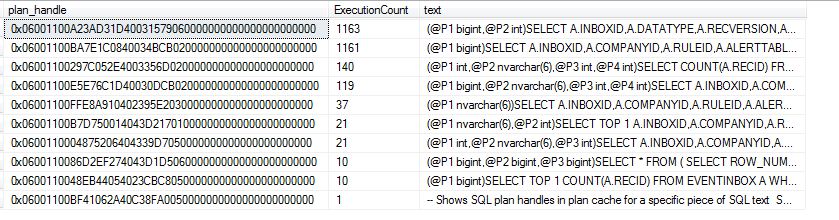
This query will show you the plan handle value you need to extract the query plan from the plan cache, it will also show you how many times the query has been executed using that plan handle.

-- Shows SQL plan handles in plan cache for a specific piece of SQL text
SELECT plan_handle, usecounts AS ExecutionCount, st.text
FROM sys.dm_exec_cached_plans
CROSS APPLY sys.dm_exec_sql_text(plan_handle) AS st
WHERE text LIKE N'%<Enter Table name or partial Query here>%'
ORDER BY usecounts DESC

 Query#2 

Using the plan_handle value from Query#1 insert it into the where clause and this will give you XML result which you can click on to view the graphical query plan.

-- Show XML query plan ** Only works with SSMS2008 **
SELECT *
FROM
sys.dm_exec_query_plan(<Paste Query "plan_handle" value from previous query here>)


Example:

Query#1 Results of ‘%EVENTINBOX%’ 

Query#2 – XML result of plan_handle (0x06001100A23AD31D40031579060000000000000000000000) from highest exection count of Query#1


Query#2 – Visual Query Plan after clicking on XML result show above

Update to Ola Hallengren’s SQL Server Maintenance Solution available – Support for SQL Server 2012

New Version Available

A new version of the SQL Server Maintenance Solution by Ola Hallengren’s is now available. The new version supports SQL Server 2012.

One new feature in SQL Server 2012 is AlwaysOn Availability Groups. This feature supports multiple replicas of a database. You can back up any replica and define a preferred backup replica.

SQL Server 2012 also supports online rebuilding of indexes with varchar(max), nvarchar(max), varbinary(max), or XML data types or large CLR types. The new version of the SQL Server Maintenance Solution makes use of this capability.


You can read more about the most recent version of the solution at
http://ola.hallengren.com/versions.html

or download it at

http://ola.hallengren.com/scripts/MaintenanceSolution.sql


New Documentation

Updated documentation is now available at

http://ola.hallengren.com/sql-server-backup.html
http://ola.hallengren.com/sql-server-integrity-check.html
http://ola.hallengren.com/sql-server-index-and-statistics-maintenance.html


Microsoft SQL Server 2012 Courses Released on MVA

5 new SQL Server 2012 courses are available on Microsoft Virtual Academy’s site http://www.microsoftvirtualacademy.com/

Follow the below links to read more about them:

Breakthrough Insights using Microsoft SQL Server 2012 : Analysis Services and Credible, Consistent data

Breakthrough Insights using Microsoft SQL Server 2012 : Reporting Services and Visualization

Breakthrough Insights using Microsoft SQL Server 2012 : Scalable Data Warehouse and Beyond Relational

Cloud on your terms with Microsoft SQL server 2012 : Scale On Demand

Mission Critical Confidence using Microsoft SQL Server 2012

Dynamics AX 2009 components are installed into an incorrect directory and the install fails

I recently encountered an issue when installing a 2nd AOS on a server that it failed to install correctly.  The components were attempting to install into an incorrect directory, therefore the install failed as it was unable to register the service correctly.

You may see the following error message within the “DynamicsSetupLog.txt” install log.

AOS.1: Regasm C:\Windows\Microsoft.NET\Framework64\v2.0.50727\regasm.exe   "C:\Program Files\Microsoft Dynamics AX\50\Server\Server\LiveAOS02\Bin\Microsoft.Dynamics.IntegrationFramework.dll"
RegAsm : error RA0000 : Unable to locate input assembly 'C:\Program Files\Microsoft Dynamics AX\50\Server\Server\LiveAOS02\Bin\Microsoft.Dynamics.IntegrationFramework.dll' or one of its dependencies.

An error occurred during setup of Application Object Server (AOS).
Reason: Error unregistering  Microsoft.Dynamics.IntegrationFramework.dll. Program run: C:\Windows\Microsoft.NET\Framework64\v2.0.50727\regasm.exe.  Parms: "C:\Program Files\Microsoft Dynamics AX\50\Server\Server\LiveAOS02\Bin\Microsoft.Dynamics.IntegrationFramework.dll" /unregister

As you can see it’s attempting to install the AOS into an incorrect directory namely:

C:\Program Files\Microsoft Dynamics AX\50\Server\Server\

The correct folder is:

C:\Program Files\Microsoft Dynamics AX\50\Server\

A hotfix exists to resolve this issue it can be download from Customer Source here: https://mbs2.microsoft.com/Knowledgebase/KBDisplay.aspx?scid=kb;en-us;959494

View the knowledge base article on the MS Support site here:  http://support.microsoft.com/kb/959494/en-us

SQL Agent Jobs refresh times when using sysjobschedules table

A recent issue I was looking at confused me as we were adding SQL Agent Jobs to run a SSRS report but the agent job was not appearing in the ‘sysjobschedules’ table, eventually the job did appear but why did it not appear straight away.

The reason is the the sysjobschedules table refreshes every 20 minutes, which may affect the values returned by the sp_help_jobschedule stored procedure.

Read the article here on MSDN


SQL Server Administration – SQL Object Naming Convention

It’s useful to use a naming convention on Agent Jobs or Maintenance plans, this ensures they are grouped together and easier to find when you have lots of job or maintenance plans on your SQL Server.

Download (PDF Version) SQL-Server-Object-Naming-Conventions-Administration (1045 downloads )

Download (Word Version) SQL-Server-Object-Naming-Conventions-Administration (1555 downloads )

Introducing Microsoft SQL Server 2012 – Free E-Book

Introducing Microsoft SQL Server 2012, by Ross Mistry (@RossMistry) and Stacia Misner (@StaciaMisner), is now available as a free download!

It’s available in the following formats:

PDF , MOBI (Kindle Format), EPUB

Introducing Microsoft SQL Server 2012 includes 10 chapters:

PART I   DATABASE ADMINISTRATION (by Ross Mistry)

1.   SQL Server 2012 Editions and Engine Enhancements

2.   High-Availability and Disaster-Recovery Enhancements

3.   Performance and Scalability

4.   Security Enhancements

5.   Programmability and Beyond-Relational Enhancements

PART II   BUSINESS INTELLIGENCE DEVELOPMENT (by Stacia Misner)

6.   Integration Services

7.   Data Quality Services

8.   Master Data Services

9.   Analysis Services and PowerPivot

10.   Reporting Services